GIVE U USEFUL INFO AND ONLY SERVE FREE SOFTWARE AND ALSO FREE GAME DOWNLOADS
You may access this blog at http://www.aseptilena.co.nr
or you can also type aseptilena.co.nr in address bar...

Sunday, June 14, 2009

Folder Tweaker,The Best Method to Beautify Your Folders...

Folder Tweaker (I abbreviated "FT") is a software or applications that have two main functions. Its function is to change a folder icon and replace the background.
There are some advantages that we can use FT. We can choose own icon and image/picture that we wish to install to the folder that we want to modify.
In addition, the FT we can add info tip (= paper that will appear when a folder is highlighted or when the mouse cursor right on the top of the folder).
Unfortunately, this only Folder Tweaker only provides 2 color as the color of text in the modified folder, exactly black and white.

Click here to download...

How to Use it???
Here I will explain how to use this software.
First, run this software first. A new window will appear as below ...
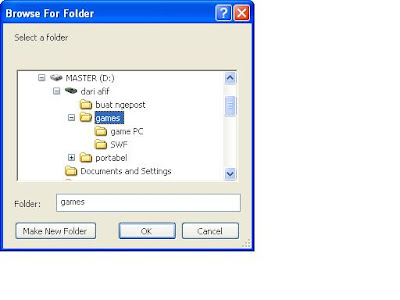


Choose folder that we wanna modify, for example I choose a folder named "games".

Then a new window will appear as below.
Here you choose to live icon, image, and text color.
You can also add an info tip to the folder.


After you have finished selecting, click the OK button.
Do not be surprised if the application is suddenly out automatically, because that's the application.
Now you can enjoy a more beautiful folder and interesting.
Little information, if you want to modify another folder you have to run this application again.
Hopefully useful ...

Sunday, May 03, 2009

Newest Mcafee Stinger Antivirus


I have posted before that stinger is a portable antivirus from mcafee.
Now I have a good news to everyone.
The developer of this antivirus has developed the newer stinger.

They are some improvements that included.
The thread or virus database has increased.
Beside, it can detect more conficker variants.
So we can use it to detect many more viruses.

For information, we can use these parameters below to the file shortcut.


* /ADL - Scan all local drives.
* /GO - Start scanning immediately.
* /LOG - Save the log file after scans.
* /SILENT - Do not display graphical interface.

It's the steps to use the parameters...

First, you must create a shortcut from the stinger appication file (I suggest you to place

it to the desktop because it will easy to run the stinger).

Then, right click to the shortcut. And choose properties.

In the properties window there is a text box named Target.
You can see text like this below...

D:\STinger\stinger1001546.exe

You just have to write the parameter after the text.
And here are the result...(for example)

D:\STinger\stinger1001546.exe /ADL

Make sure that there is a space between the file location and the parameter.
To use multiple parameter you should separate parameter one and the other parameter by space.

Click here to download the newest stinger antivirus.

Tuesday, April 21, 2009

Kill - "Not Responding Apps Killer"

Do you feel hard to close not responding application normally?
If you say yes, so you can feel how hard is to close it.
You must run task manager first, then you must select or decide what process you wanna close.
Anyway, I have a solution for your problem.
The solution is you should use Kill.

Kill is an software for closing application that not responding.
To use it you must only run it. And you will see a skeleton head image below your mouse pointer...
< Like this
< Like this


After that, you can close the not responding application by clicking the window.

Click here to download it.

Sunday, April 12, 2009

Top Style Lite, Best Completely Free Editor for CSS

Cascading Style Sheets (CSS) is a style sheet language that used to describe the presentation (that is, the look and formatting) of a document written in a markup language. Its most common application is to style web pages written in HTML and XHTML, but the language can be applied to any kind of XML document, including SVG and XUL.

There is a simple editor of CSS, it's Top Style Lite. It use tree style to display the parts of a CSS file, like Explorer Style.
There are some excess that you can feel. The first, top style lite can preview the CSS that opened.
Second, it has Style Inspector that can inspect the contents of CSS and style for most of web browser like Firefox, IE, and the others, CSS for mobile included.Third, its size is small enough (only 1.4...Megabytes).

Click here to download

Screenshot :

Thursday, April 09, 2009

Tips for Accelerate Windows XP Booting

Perhaps you have experienced a very slow windows booting.
Here are the steps to be booting into your windows faster:

Step 1:
Open notepad application
Type "del c: \ windows \ prefetch \ ntosboot-*.* / q" (without the quotes)
and save as ntosboot.bat in the name of the drive c: \

Step 2:
Then click the Start menu-> Run-> and type gpedit.msc

Step 3:
Click Computer Configuration-> Windows Settings-> Scripts-> 2 times and click on Shutdown

Step 4:
In Windows Shutdown Properties click add browse ago. and search the file location ntosboot.bat that you created earlier and click open

Step 5:
Then click OK, Apply and OK again to finish

Step 6:
Then click the Start menu-> Run-> devmgmt.msc and

Step 7:
Click IDE ATA / atapi controllers-> Primary IDE Channel (click 2 times to open the properties)

Step 8:
Select Advanced Settings
In the Device 0 or Device 1
Change Device Type None into (Change Device Type only option that is not locked)

Step 9:
Click IDE ATA / atapi controllers-> Secondary IDE Channel (click 2 times to open the properties)
Repeat Step 8 as

Step 10:
Restart your Computer and you can see the changes.

Hopefully helpful

How to Unactivate or Stop Autoplay (Windows)

Autoplay is a service from windows that can give options if there is a removable drive or CD plugged in to the computer.
Most of virus use it to infecting a computer that use Windows.
But there is a method to prevent computer from infection (excluded antivirus).
The method is by stopping the autoplay service, and here are the steps...

First, click start button at your desktop screen. Then choose "Run".

After that, fill the blank textbox with "gpedit.msc".

Then after you see a new window, choose Administrative Templates --> System
Find "Turn off autoplay" in the folder. And double click it.
After you see a window like below, choose "Enabled" and in the circled box choose "All drives"


Finally, just click OK...

Tuesday, April 07, 2009

Download - My Zoom


My Zoom is a tool to make NO$GBA's Screen wider or to zooming in the screen of that emulator. By using this tool user can customize the emulator screen according to desktop resolution. The most interesting feature is user can choose rendering software (openGL or DirectX). So if you have a great graphic adapter/graphic card, the emulator game will be better in graphic quality.


Click here to download


Video :

Download - PCMAV Express


PCMAV Express is antivirus that especially use to remove conficker.

If U wanna use it, please make sure your computer antivirus has been inactived and your computer not connected to a network or internet.

Click here to download

AVZ - Free Antivirus, malware, etc. from Kaspersky

AVZ is a tool for helping in deleting malware; spyware, adware, trojan, dialers and can detect keyloggers and rootkits. Features of avz can be seen in the screens below.

It is NOT a substitute for an antivirus, nor has complexed algorithms for curing a system.

CLICK HERE TO DOWNLOAD

Screenshots :


Sunday, April 05, 2009

Take Care of Our Flashdisk

Flashdisk is a kind of data storage. Most of people in the world have it, because flashdisk is portable and easier for saving data.
If we don't take care of it, it will be broken, right...?
But don't worry, there are some tips to prevent our FD not broken.
And here are the tips :

> Keep your FD from oil or something like that. Because in the time before I ever put my FD edge in to kerosine to remove its rust. But the result is different, my FD become write-protected. I can't copy or store my data to it, format it, defrag it. That was my unforgetable thing. Unbelieveable....

>Keep your FD far from water except for waterproof FD. Its to prevent our FD from rust.

>Make sure your FD defragged periodically, maybe once a week or once per month.

If you wanna download software for defragmentation, please check my previous post.

Saturday, April 04, 2009

Download - Standalone Flash Player v.10 for Playing All Flash Games without Internet


There are many flash or ".swf " games in the world. We usually play them on the internet. But, there is a way to play them without internet. And it's can be true by using this software (Standalone flashplayer).
With it we can play every ".swf " files or game flash like playing a normal PC games.
Wanna try this ???

For windows user : click here to download...

For mac user : click here to download...

For GNU/linux user : click here to download


Screen shot :

Thursday, March 26, 2009

Download - Defragler (Tool for faster defragmentation)

Every hardware needs a care, included hardisk. There are some methods that can be use to take care of our hardisk. One of them is defragmentation. This method benefit is user can fix the sectors of data with one software.
Defragler is a software for defragmentation. It can defrag data faster than Windows default defragmentation software. Its not only can defrag data but also can defrag freespace.

Click here to download...

Screenshot :


Defragler Official Website :
http://www.defragler.com

Sunday, March 22, 2009

Download - Real Race

Real Race is an awesome driving game where you can choose from more than a dozen cars and compete through 50 different championships. Real Race offers a wonderful 3D environment of great detail in the game. This game is from gametop.com, so we can play this game wthout paying for a license key or serial number. Coz that is gametop excess.

Click here for download

Screenshot :


Official Web: http://www.gametop.com

Monday, March 16, 2009

Mcafee Portable Antivirus (Stinger)

Mcafee Stinger was developed by Mcafee antivirus developer. It contains 236 common virus list. The excess of this antivirus are :

-It can repair "exe or application file" that have infected by viruses.

-It's portable, so we can use it wthout any installation.

-It's just a file, it doesn't need any database or any other files.

-The size of this application is under 3Mb(3 Megabyte)

If u wanna download, click here.
The link above has renewed.
Screenshot :


Sunday, March 08, 2009

Winpooch, An Opensource Watch-dog for Windows

About Winpooch

Winpooch is a Windows watchdog, free and open source. Anti spyware and anti trojan, it gives a full protection against local or external attacks by scanning the activity of programs in real time. Associated with ClamWin antivirus, Winpooch keeps safe your computer against virus.

API Hooking

Winpooch uses the API Hooking method. It spies programs when they are running and gives to the user a powerful control of their activity.For example, you can forbide a program to write in a system directory or in the registry, or else to connect to internet. That makes the difference between others anti spywares using a database of known signatures.

Antivirus

ClamWin is an open source antivirus for Windows that can not scan files in real time, unfortunately. With Winpooch, just associate ClamWin and it will be possible to detect virus in a program before it runs.

Origins

Our first aim was to develop a program that could detect virus infection such as spywares and trojans. At the beginning, Winpooch (before the version 0.5) was only able to alert the user when a program tried something suspicious, but that was not enougth reactive. So we decided to make a new release that could offer to the user a powerful control of the computer system.

Details

  • Description: detection of spywares and trojans. It becomes an anti virus if associated with ClamWin
  • Development Status: open source project in progess
  • Environment: Win32 (MS Windows)
  • License: GNU General Public License (GPL)
  • Natural Language: English, French, Italian, Polish
  • Operating System: 32-bit MS Windows (NT/2000/XP)
  • Programming Language: C

Name: Winpooch
Birthday: 2004-10-26

Click here to download the installer

or

Click here for download the source file for developer

Screenshot :

Not avaliable yet

Source : Winpooch Official Website

Saturday, March 07, 2009

Download : Newest Naruto Ninja Way


It's a fighting game. Character of this game is based on manga anime "Naruto". In this game version we can fight using 10 characters, like Naruto, Sasuke, Kakashi, Lee, Zabuza, Sakura, Sakura(Teenager), Obito, Hinata, and Shikamaru. I've replace the broken link with the fixed one from the developer's site. This link contain the newest version, so if there are some improvement with the game, this link will still up to date and we won't be left.


Tuesday, March 03, 2009

Chat Through Web Browser

To make a Chat, there are many chat services that we can use for free such as Yahoo Messenger, MSN, Google Talk, ICQ and more.
To use the chat service, and usually we are required to download chat software and install the first in our computer.
Here are some sites that provide web services for Chat Via browser that we can use without having to install the chatting software first in our computer.

1. http://www.meebo.com
Chat support services: AIM, Yahoo Messenger, MSN, Google Talk, ICQ, Jabber, and Facebook

2. http://ebuddy.com
Chat support services: MSN, Yahoo Messenger, AIM, Google Talk, ICQ and Myspace

3. http://webmessenger.yahoo.com
Supporting Service Chat: Yahoo Messenger

4. http://webmessenger.msn.com/
Supporting Service Chat: MSN

5. http://www.google.com/talk/
Chat support services: Google Talk

6. http://www.aim.com/aimexpress.adp
Chat support services: AIM

7. http://www.koolim.com
Supporting Service Chat: Yahoo Messenger, AIM, ICQ, Google Talk, Gadu-Gadu, and X-Fire

8. http://imo.im
Chat support services: AIM, Yahoo Messenger, MSN, Google Talk, Skype and Myspace

9. http://www.communicationtube.net
Chat support services: ICQ, Google Talk, MSN Messenger and IRC

10. Site: http://www.radiusim.com
Chat support services: MSN, AIM, Yahoo Messenger and Google Talk

11. Site: http://www.plugoo.com
Chat support services: MSN, Yahoo Messenger, Google Talk, AIM, ICQ, and Jabber

12. Site: http://www.imhaha.com
Chat support services: AIM, Yahoo Messenger, MSN, and QQ

Source : http://www.finderonly.com

The Secret of Google Chrome

Are you using Google Chrome?
If you do not have, you can download the http://www.google.com/chrome
Google Chrome is a browser that is issued by google.
Google Browser output is reputedly has the capacity and features more sophisticated than the competitors.
Matter of speed, for example, Google Chrome claimed unbeatable by any browser.

Here are some secrets hidden in the Google Chrome browser:

1. Incognito window (Control + Shift + N)
This feature allows Netter for browsing through a secure browser windows, because with this feature Netter will not leave impressions such as' search & browser history and cookies. So if Netter not sure that the site will be visited or do not want other people at work know Netter visit a site, this feature is certainly useful.

2. Alt + Home or Control + Q
Showing all the sites and bookmarks that have been previously opened by Netter in the form of a thumbnail. This feature is found in the Opera browser and add ons in FireFox. Alt + Home to open the site on the same page, while the Control + T on the new page.

3. Control + Shift + T
Reopen the tabs that are not deliberately closed by Netter when browsing. Google Chrome can remember up to 10 tabs you closed accidentally.

4. Control + Tab (Control + Shift + Tab)
Try to use this shortcut to move quickly with the tab, Control + tab to go, and Control + Shift + Tab to move back. Alternatively to direct the position of the lead-up to the series is with the shortcut Control + 1, Control + 2 to the Control + 9.

5. Opens With Quick Link Site
To open a link with the fast, Google Chrome offers the same features with FireFox 3, with a mouse click on the scroll Netter directly or click the link and drag it to the browser tab.

6. Bookmark Site With Fast
Click the star on the left of the address bar of your browser. Chrome Address bar can also function as a direct seacrh page directly to the search engine that we want

7. Control + B
Hide and show the Bookmark browser quickly.

8. Control + H
Open all the sites that have been visited (history) quickly. On the right there is the option delete history for this day, if you want to delete Netter history has ever visited the site on that day.

9. Control + A
Open the windows download file. Shortcut is the same as in the FireFox

10. Shift + Escape
Open the Google Chrome task manager to quickly view the memory consumption and to turn off the tab which has the potential to make the browser freeze (hangs)

11. about: plugins & about: crash
Enter the word about: plugins in the address bar to see what plugins are installed on Chrome. And about: crash to see the tabs which make Chrome crash, freeze or hang. Other features: about: stats, about: network, about: histograms, about: memory, about: cache, about: dns, about: Internets

12. Access menu on Chrome
Netter can access the menus to re-Optimize and customize the browser on the right side. Choose a menu that is image 'key UK' and choose the option. In it there are many options such as Chrome as the default browser, change the default Search, change the language, and so forth.

Source : http://www.finderonly.com

8 Open Source Applications for Web Designer

There are a lot of open source applications that can help you, as a web designer.
In this article, you will find the 8 applications open source is very useful for a web designer.
Application can help you simplify the process of making a website.

1. SeaMonkey
SeaMonkey developed by the Mozilla Foundation.
SeaMonkey is an "all-in-one" web browser that is simple but powerful editor for HTML.
Download: http://www.seamonkey-project.org/

2. KompoZer.
KompoZer is a fully-featured web authoring system that integrated the intuitive FTP client and support for all operating systems.
Download: http://kompozer.net/

3. Notepad + +.
Notepad + + is an open source application that is popupler as a text editor for Windows.
Although it is not just solely for the web designer, but this application has a "source code editor" editor that supports HTML, XML, CSS, and JavaScript.
Download: http://notepad-plus.sourceforge.net/uk/site.htm

4. Editor bluefish.
Bluefish Editor is an application that is lightweight and quick to process that editor is for web designers and programmers.
Wizards have fasiltas useful for creating HTML documents.
Download: http://bluefish.openoffice.nl/

5. Quanta Plus.
Quanta Plus is a web development IDE.
Quanta Plus is very extensible and can run custom scripts.
This application is very good for the css editor for the code hints and auto complete syntax.
Download: http://quanta.kdewebdev.org/

6. Amaya.
Amaya is a free application, open source web editor and web browser developed by the World Wide Web Consortium (W3C).
Amaya started as an HTML / CSS editor, and has developed into an editor for a variety of XML-based systems such as MathML and SVG.
Download: http://www.w3.org/Amaya/

7. OPEN BEXI HTML Builder.
OPEN BEXI HTML Builder is a browser-based open source application for creating HTML web pages.
OPEN BEXI HTML Builder has built CSS color picker.
Download: http://sourceforge.net/projects/ob-htmlbuilder/

8. jEdit.
jEdit is a text editor for programmers.
jEdit can run on Mac, Windows, and Linux and have facilities "syntax Highlighting for HTML, XML, CSS, JavaScript and other programming languages.
Download: http://www.jedit.org/

Source : http://www.finderonly.com

Saturday, February 28, 2009

10 Best Internet Browser

1. Firefox
Mozilla Firefox (originally named Phoenix and then for the moment known as Mozilla Firebird) is a web browser for free inter-platform developed by Mozilla Foundation and hundreds of volunteers.
Version 3.0 released on 17 June 2008.
Website: http://www.mozilla.com/firefox/

2. Google Chrome
Google Chrome is an open source web browser developed by Google using the WebKit rendering engine.
Open source project called Chromium own.
Website: http://www.google.com/chrome

3. Internet Explorer
Internet Explorer, abbreviated IE or MSIE, is a proprieter of a web browser for free from Microsoft.
Website: http://www.microsoft.com/windows/products/winfamily/ie/default.mspx

4. Opera
Opera is a web browser and Internet software packages inter-platform.
Consists of a collection of opera software for a web browser such as Internet, and software to read and send electronic mail.
Website: http://www.opera.com/download/

5. Safari
Safari is a browser made in Apple Inc. originally intended specifically for the Mac OS operating system.
Safari dibundel with Mac OS X and is the default browser in the operating system since Mac OS X v10.3.
Website: http://www.apple.com/safari/download/

6. Maxthon
Maxthon is a browser that uses IE engine property, Trident, and 100% compatible with IE, added with many features that are not owned by IE.
Website: http://www.maxthon.com/

7. Flock
Flock is a web browser that specializes in the provision of social network features and other Web 2.0 features on the display interface.
This browser is made using Mozilla's Firefox codebase On June 16 2008, Flock 2 is using Mozilla Firefox 3 as basisnya, launched the open beta status.
Website: http://flock.com/

8. Avant Browser
Avant Browser is a browser that is fast, stable, user-friendly, and is a multiwindow browser.
Indeed, the engine used is the IE engine. Avant Browser akan but have advantages compared to IE.
Website: http://www.avantbrowser.com/download.html

9. Deepnet Explorer
Deepnet Explorer is a web browser, Deepnet Explorer has a tab browsing feature support for multiple pages
Website: http://www.deepnetexplorer.com/

10. PhaseOut
PhaseOut is the Internet browser that allows multiple searches with the major search engines with just one click.
Website: http://www.phaseout.net/

Source : http://internet-browser-review.toptenreviews.com/
Indonesian Source : http://www.finderonly.com

Please Say Anything...


ShoutMix chat widget